Choose what the boundary must prevent
Start with the outcome: should the robot stay off the rug altogether, or may it vacuum there while keeping the mop away? Check your exact model's instructions before choosing a similarly named app setting.
iRobot's Keep-Out guidance describes rectangular exclusions on an Imprint Smart Map that keep the robot away. In that guidance, the exclusions remain active whether you start cleaning by phone, voice assistant or the robot's CLEAN button. That is a statement about the documented iRobot feature, not every robot's start controls.
For Roomba Combo j7+/j9+, iRobot instead directs owners to a purple No Mop Zone when an area should not be mopped. Do not infer from the name alone whether your own robot will cross, vacuum or avoid the area; confirm its documented behavior with the mop fitted.
If you cannot establish how it keeps the wet pad off this rug, keep the rug out of the mopping route for now. Buying another robot is not the first step.
Cover the rug and preserve a route
Open the map for the floor you are cleaning and compare the rug's position with nearby walls and doorways. If those landmarks do not line up, resolve the map problem before fine-tuning a small exclusion.
For a practical starting layout, draw the exclusion around the whole rug, including any fringe, with some space beyond its edges. This is an editorial precaution, not a manufacturer-specified universal margin. Do not use a fixed distance borrowed from another robot.
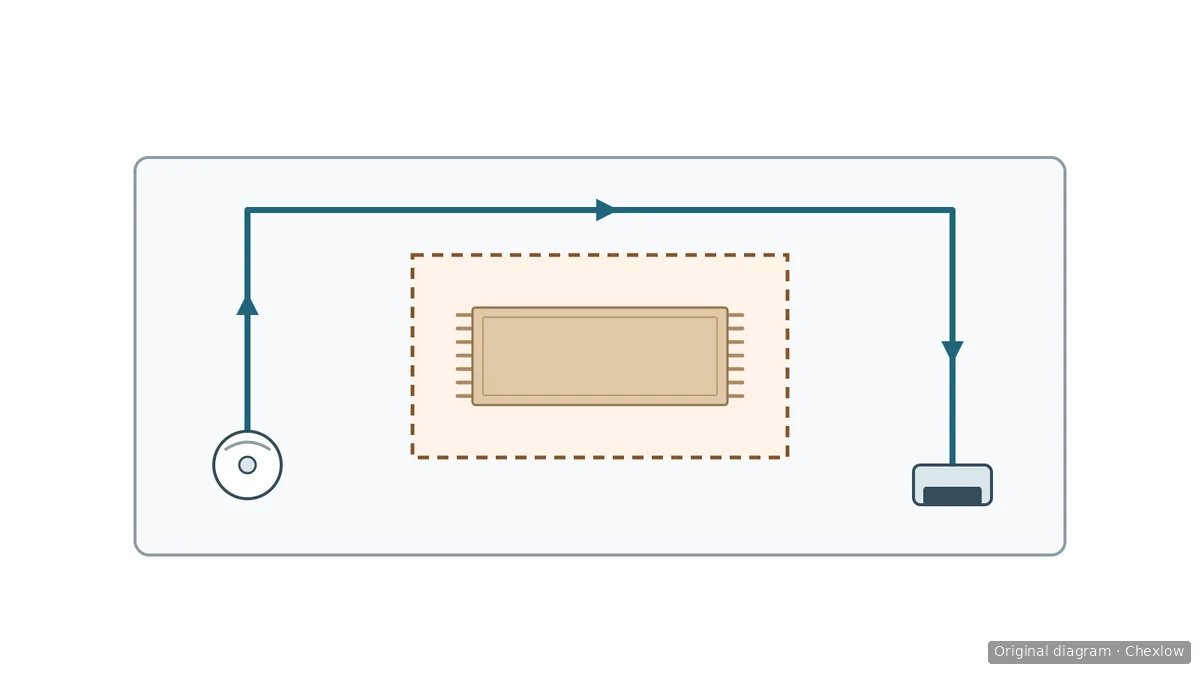
The dashed rectangle marks the no-entry area, including every fringe; the arrows show an example route outside it from the robot to the dock. This is a conceptual diagram: the drawn corridor does not establish an actually passable width, actual dimensions or required clearance. Check the available space and your robot's requirements in your home.
The diagram shows a complete keep-out layout. It does not show how every no-mop mode behaves. Leave a usable route around the boundary to the remaining floor and dock. If the rug fills the only doorway, do not shrink the exclusion onto the rug just to make a route appear on screen; move the rug temporarily if practical, or clean the separated area another way.
Save the change and reopen the map to check it. After moving the rug, revisit the boundary rather than assuming the old rectangle still fits.
Check what happens to the mop
Roborock's four-mode explanation distinguishes these behaviors. Use them only where your model actually offers the corresponding setting:
- Rise: carpet detection lifts the mop and stops water flow for carpet vacuuming.
- Avoid: the robot avoids carpets completely.
- Ignore: intended for places without carpets or with mats that may be mopped.
- Cross: crosses mats or carpets without cleaning them.
Crossing without cleaning is not, by itself, a statement that a wet pad cannot touch your rug. Likewise, stopping water flow does not tell you the pad is dry. Confirm the physical mop handling, not just the cleaning label.
Roborock's automatic-lifting note recommends that mode for short-pile carpet and limits its advice to S7, S7MaxV, S7Max Ultra, S8, S8+, S8 Pro Ultra and Q Revo. It does not establish clearance for every thick or fringed rug, or every Roborock model.
For a separate vacuum-only run, follow your robot's instructions on removing the pad or mop assembly. Do not assume selecting vacuum-only makes an attached wet pad harmless.
Watch the boundary before returning to scheduled cleaning
After saving the settings, observe the first run near the rug and the return route. Watch the edges and turns, not just whether the robot's center stays outside the colored box. Stop if the wet pad reaches the rug or the robot enters an area you intended to exclude.
If contact occurs at an edge, leave mopping paused there while you recheck the map, the boundary and the selected mode. Do not keep sending a wet pad over the same spot to find a smaller margin. For the documented Roomba Combo j7+/j9+ models, iRobot says to contact customer care if the robot mops inside a No Mop Zone. Have the model details, map screenshot and a description of where contact occurred ready.
If exclusion leaves the rug uncleaned, use suitable cleaning equipment you already own. Only if you lack a workable way to clean that area does it make sense to compare manual cordless cleaning with robot coverage. The remaining job should determine any purchase, not the presence of an empty patch on the robot's map.
Comment ce guide a été conçu
AI wrote this guide for Chexlow using Roborock and iRobot support documentation. Model-specific controls are separated from the editorial suggestions for drawing and checking a boundary; no household performance testing was performed.
Original SVG diagrams created for Chexlow